![ComplianceHR-Logo-400x100.png]](https://knowledge.compliancehr.com/hs-fs/hubfs/ComplianceHR-Logos/ComplianceHR-Logo-400x100.png?height=40&name=ComplianceHR-Logo-400x100.png)
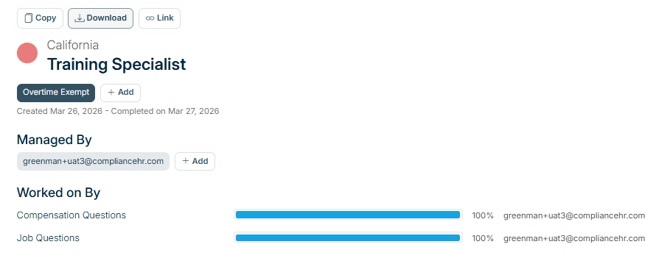
The Smart Content page of each evaluation offers additional features to help you manage your Evaluations.
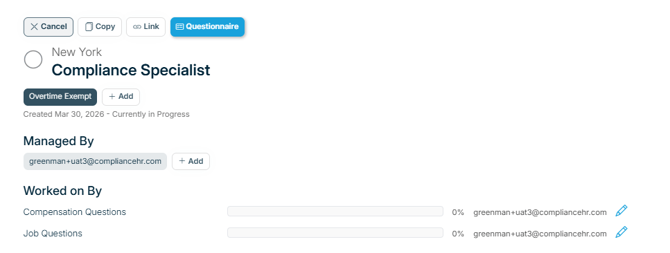
For new or in-progress evaluations, you'll find the following options:
Cancel - allows you discontinue an In-Progress evaluation. Canceling will not delete the questionnaire from the Risk Center.
If there was an error on a completed evaluation and it has been copied and corrected, consider using custom tags to distinguish the difference between the two evaluations.
Copy - you can copy in-progress or completed evaluations and apply a new Work State to save administrative time. Select Copy and follow prompts.
Link - provides a unique link to this specific evaluation that allows the Manager to share it with other platform users.
Questionnaire - displays only for evaluations not started or in progress.
Tags - The type of evaluation tag will always display. In this case it is Overtime Exempt. Select +Add to include custom tags to organize your evaluations.
Managed By - The “Managed By” section shows all users who have access to the evaluation. Managers can copy, cancel, or download the evaluation, update tags, and add or remove other Managers. They can also see who’s assigned to the questionnaire and adjust assignments as needed. Any action taken by a Manager is automatically captured in the Activity Log. By default, the first Manager is the user who created the evaluation.
Worked On By - The “Worked On By” section shows who’s assigned to the questionnaire and lets managers update those assignments.
To update an assignment, click the pencil icon and enter a new email address.
Assignees don’t need platform access, they can simply be someone more familiar with the subject matter. You can reassign either section even while in progress. Once a section is completed, the pencil icon will disappear.
For completed evaluations, your options change.
Download - provides you with a PDF version of the risk report.