![ComplianceHR-Logo-400x100.png]](https://knowledge.compliancehr.com/hs-fs/hubfs/ComplianceHR-Logos/ComplianceHR-Logo-400x100.png?height=40&name=ComplianceHR-Logo-400x100.png)
The “Worked On By” section shows who’s assigned to the questionnaire and lets managers update those assignments to someone who may be more familiar with the role or engagement. Assignees don’t need platform access, they can simply be someone more familiar with the subject matter.
Do not use the “Link” at the top of the evaluation smart page to share the evaluation with someone that does not have platform access. The questionnaire should only be shared following the steps below.
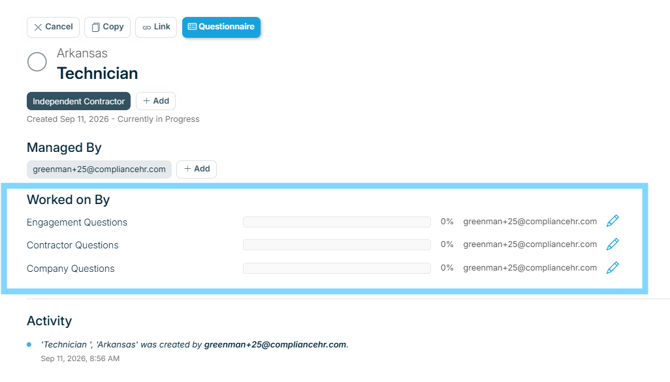
To update an assignment, click the pencil icon next to the section of the questionnaire you would like to assign out and enter a new email address. Select Save to send.
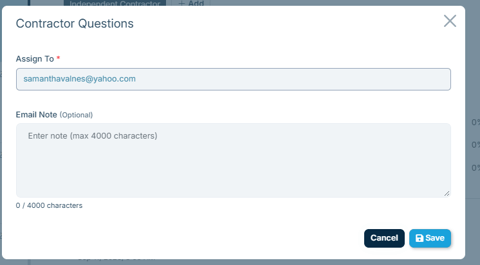
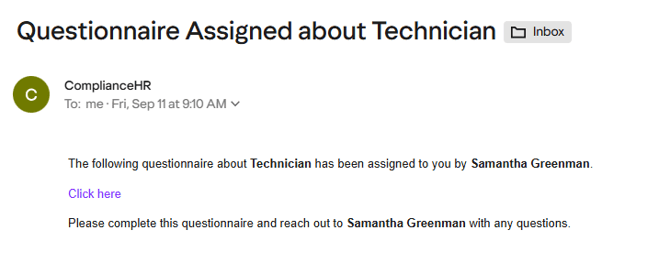
The questionnaire recipient will receive an email from no-reply@compliancehr.com. The subject line will read Questionnaire Assigned about “Subject”. No password will need to be created. The questionnaire recipient will select the Click Here link to access the questionnaire and submit their responses.
See example below:
If a recipient does not receive their email, and cannot locate it in spam, it can be resent by taking the same steps above.
Note: This step does not currently show in the activity log.